Empowering your business with innovative IT solutions that drive growth.
 Support : +1 (516) 851-8918



SAP Sales and Service Cloud Release 2502: What’s New?
The month of February brings exciting updates to the SAP Sales and Service Cloud with the release of version 2502. In this blog post, we highlight planned timeline, the key features and improvements introduced in this latest update.
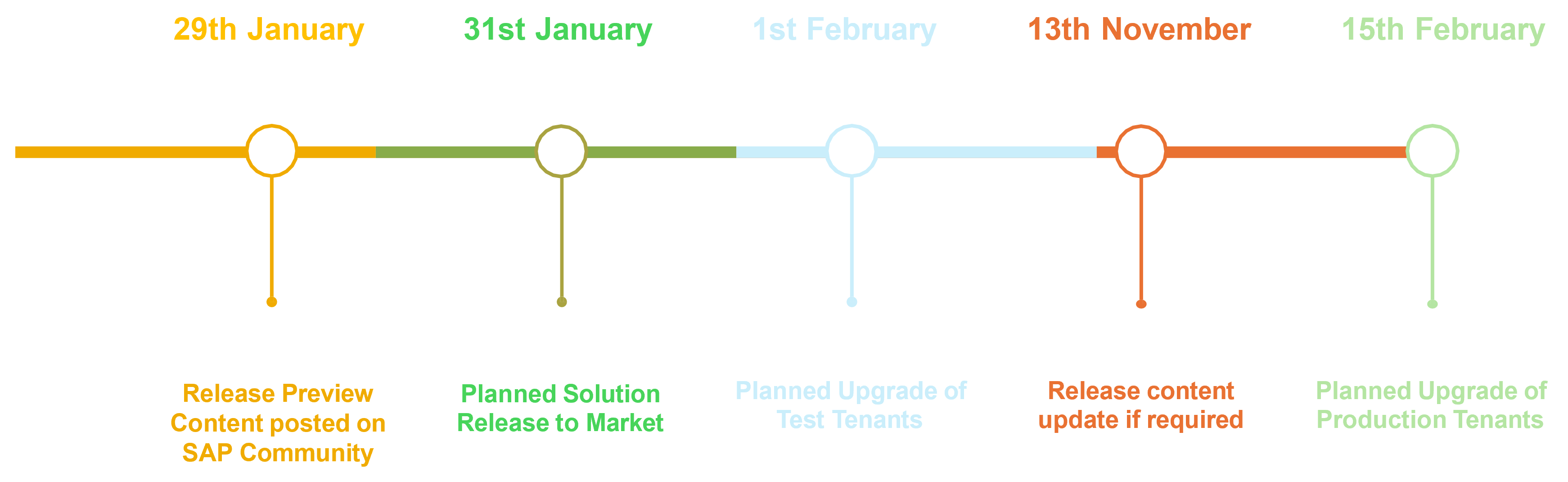
On the weekend of February 1st, SAP upgraded all test tenants to the 2502 release, with the production environment set to receive the update two weeks later, on the weekend of February 15th. Let’s explore what’s new!
Platform & Integration
Workflows
One of the major enhancements in workflows is the ability to communicate with end customers in their preferred language. This improves the customer experience by ensuring that email templates prioritize the contact’s language over the account’s language when sending workflow emails to the main contact.
Prerequisites:
- The contact must be linked to an account.
- Under Workflow Settings, “Use main address of the recipient to send out email and SMS” must be enabled.
To activate this feature, customers can request it via a support ticket to LOD-CRM-WKF.
Migration V1 to V2
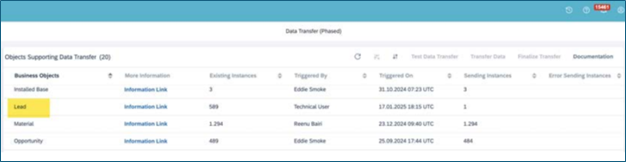
SAP continues its transition from V1 to V2, enhancing the Data Transfer tool to support the migration of Leads from V1 to V2 with some restrictions.
Sales Enhancements
Groupware Integration
The Groupware configuration now includes the ability to display the ServerSync version, allowing users to compare their installed app version with the server-side version and the Microsoft Outlook Add-In.
Intelligent Sales Add-On
Transfer of Credit Values:
The first step involves transferring the credit values from open orders and deliveries to the credit exposure. This ensures that any outstanding amounts tied to orders and deliveries are reflected in the credit management system.
Recalculation of Payment Behavior:
The payment behavior data is recalculated using the information from Accounts Receivable (FI-AR). This ensures that historical payment patterns are accurately captured and incorporated into the credit exposure calculations.
Dynamic Visit Planning Add-On
Tablet Support for Cockpit:
Users can now access the cockpit from tablets and browsers, making it easier to manage sales activities across devices.
Enhanced Calendar Functionality:
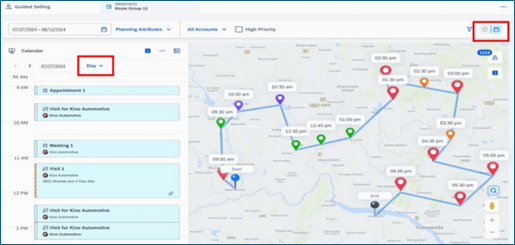
- The calendar now includes appointments with locations in addition to existing visit lists and planned visit items
- Calendar & Map Views: Users can switch between calendar and route (map) views with day/week view options
- Drag & Drop Planning: Visit list items can now be moved within the calendar, and accounts can be added from maps or lists
Service Enhancements
Migration V1 to V2
SAP is transitioning Tickets from SAP Cloud for Customer V1 to Cases in SAP Service Cloud Version 2.
Recent supported attributes:
- The calendar now includes appointments with locations in addition to existing visit lists and planned visit items
- Calendar & Map Views: Users can switch between calendar and route (map) views with day/week view options
- Drag & Drop Planning: Visit list items can now be moved within the calendar, and accounts can be added from maps or lists
Ticket Management Updates
- The calendar now includes appointments with locations in addition to existing visit lists and planned visit items
- Calendar & Map Views: Users can switch between calendar and route (map) views with day/week view options
- Drag & Drop Planning: Visit list items can now be moved within the calendar, and accounts can be added from maps or lists
Agent Desktop Add-On
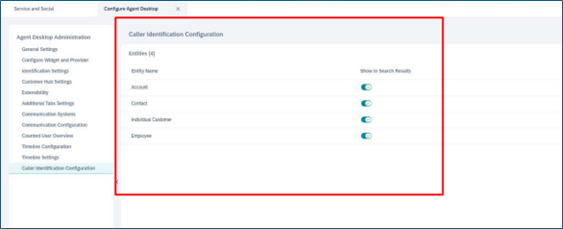
Administrators can now control which Business Partner entities appear in the Agent Desktop Search when an incoming call or message is received.
SAP’s Shift in Release Communication
Starting with release 2502, SAP is moving away from quarterly release webcasts and will now communicate updates via blog posts. For all future quarterly release details, check out the Qnovate Blog.
Ready To Transform your Business?
Ready to transform your business and need more information about our conversion accelerator?
Contact with Our Advisor